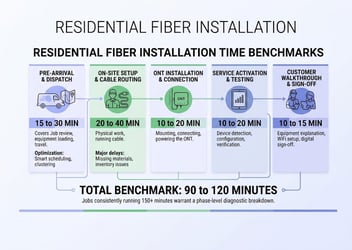
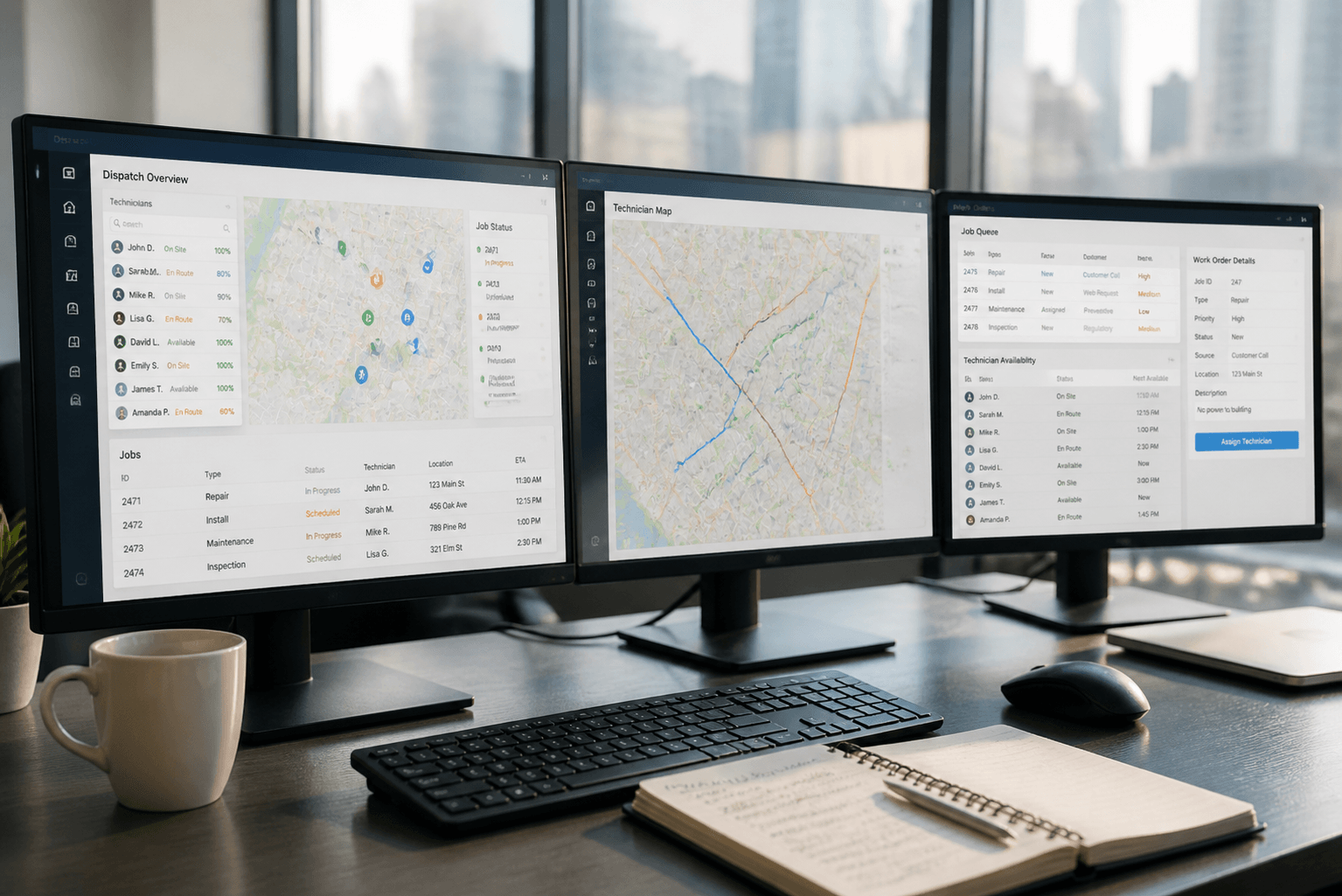
When a utility dispatch manager opens three tabs to schedule a single truck roll, something is wrong. One system for work orders. Another for technician availability. A third to check inventory. By the time the job is assigned, the customer has been waiting longer than they should.
This is the reality for many utility and telecom operations leaders. AEX Inc field service management software connects scheduling, dispatch, and execution data directly to OSS/BSS workflows—so operations actually flow from order to invoice without manual reconciliation.
This guide compares seven FSM platforms built for utility and telecom operations, with a focus on scheduling and dispatch automation that connects to the systems you already run.
Quick guide: 7 FSM platforms for utility and telecom operations
- AEX: The top choice for utility and telecom operators who need scheduling and dispatch connected directly to provisioning and billing
- IFS: An option for asset-intensive industries with project management needs
- Microsoft Dynamics 365 Field Service: An option for organizations already invested in the Microsoft ecosystem
- Zuper: A straightforward FSM with work order tracking and route planning
- ServiceMax: Equipment-focused FSM with work order management
- Salesforce Field Service: FSM built on the Salesforce CRM platform
- FieldEdge: Residential and commercial service contractor-focused FSM
How we chose these FSM platforms for utility and telecom operations
Utility and telecom operators face a specific challenge: field work does not happen in isolation. Every installation, repair, or maintenance job connects to network provisioning, subscriber records, and billing. When these connections are missing, you spend more time reconciling data than serving customers.
We evaluated FSM platforms based on criteria that matter to operators managing technicians across utility infrastructure and telecom networks:
- Scheduling and dispatch automation: Can the platform assign jobs based on technician skills, location, and availability—without manual intervention?
- Route optimization: Does the system reduce travel time between jobs, helping your crew complete more work each day?
- Mobile workforce tools: Can technicians access job details, capture documentation, and update work orders from the field—even offline?
- OSS/BSS integration: Does the platform connect field execution data to provisioning, activation, and billing systems?
- Real-time visibility: Can dispatchers and managers see where technicians are and what jobs are completed, as they happen?
- Work order management: Does the system track jobs from creation through completion with audit trails and status updates?
The 7 FSM platforms for utility and telecom operations
1. AEX: The premier FSM platform for utility and telecom operations
Every utility and telecom operator knows the cost of disconnected field data. A technician completes a fiber install, but the billing system does not know for three days. A meter swap finishes in the morning, but provisioning does not trigger until someone manually updates a record. These gaps add up to revenue leakage and customer frustration.
AEX eliminates this disconnect by making execution data the connective tissue between field operations and back-office systems. When a technician marks a job complete, that data flows directly into provisioning, billing, and customer records—no spreadsheets, no data entry lag.
For utility and telecom operators scaling across regions, AEX transforms scale from a risk into a controlled and predictable outcome. The platform handles installations, faults, repairs, and project work on a single system that connects premise data, network information, and billing.
AEX features
- Skills-based dispatch automation: Jobs are assigned to technicians based on certifications, proximity, and availability—ensuring the right technician arrives with the right equipment.
- Real-time route optimization: The platform calculates efficient routes that reduce travel time and fuel costs while maximizing daily job capacity.
- Mobile workflows with offline capability: Technicians capture photos, GPS coordinates, test results, and material usage in the field—even without connectivity.
- Direct OSS/BSS integration: Execution data flows automatically into provisioning, activation, and billing workflows—so orders advance based on verified field completion.
- Real-time field visibility: Dispatchers track technician locations, job status, and completion rates as work happens—enabling immediate response to schedule changes.
- Automated customer notifications: Subscribers receive accurate ETAs and appointment updates without manual outreach from your team.
AEX pros and cons
Pros:
- Connects field execution directly to billing for faster time to invoice
- Single platform for utility and telecom work types—installations, faults, repairs, and projects
- Real-time data capture prevents incomplete or inaccurate billing records
Cons:
- Organizations using legacy ERP systems may need integration planning during implementation
- Full platform capabilities require mobile device deployment to field crews
- Training time is needed for teams transitioning from paper-based processes
2. IFS: An option for asset-intensive industries
IFS Cloud offers field service capabilities alongside enterprise asset management and project management modules. The platform includes scheduling tools that can manage technician assignments based on skills and availability.
For organizations that need asset lifecycle management alongside field service, IFS includes functionality for tracking equipment history and maintenance schedules. The system works across industries including utilities and telecommunications.
IFS features
- Asset management: Track equipment lifecycle from installation through maintenance and replacement
- Scheduling board: View and manage technician schedules with drag-and-drop assignment
- Mobile app: Technicians can view job details and update work orders from mobile devices
IFS pros and cons
Pros:
- Combines FSM with enterprise asset management in one platform
- Includes project management capabilities for larger jobs
- Supports multiple industries beyond utilities and telecom
Cons:
- Configuration for utility-specific workflows requires customization
- The platform includes modules that may not be relevant to pure field service operations
- Direct OSS/BSS integration requires additional middleware or development work
3. Microsoft Dynamics 365 Field Service: An option for Microsoft-based organizations
Microsoft Dynamics 365 Field Service is built on the Dynamics 365 platform. Organizations already using Microsoft tools may find the interface familiar, and the system integrates with other Microsoft products including Teams and Outlook.
The platform includes scheduling optimization, work order management, and mobile apps for field technicians. It connects to the broader Dynamics 365 suite for CRM and ERP capabilities.
Microsoft Dynamics 365 Field Service features
- Resource scheduling optimization: Automated scheduling considers technician skills, location, and promised time windows
- Integration with Microsoft tools: Works with Teams, Outlook, and other Microsoft applications
- IoT connectivity: Can receive alerts from connected devices to trigger work orders
Microsoft Dynamics 365 Field Service pros and cons
Pros:
- Familiar interface for organizations using Microsoft products
- Connects to Dynamics 365 CRM and ERP modules
- Includes remote assist capabilities through Microsoft tools
Cons:
- Utility and telecom-specific workflows require additional configuration
- OSS/BSS integration is not included natively—requires third-party connectors or custom development
- The platform is designed for general field service rather than network operators specifically
4. Zuper: A straightforward FSM with work order tracking
Zuper offers field service management with scheduling, dispatching, and work order tracking. The platform includes route planning and GPS tracking for field technicians. A mobile app allows crews to update job status and capture customer signatures.
The system works for service businesses that need to manage appointments, track technician locations, and process invoices. It integrates with common business tools including QuickBooks and Salesforce.
Zuper features
- Dispatch board: Assign and track jobs with a visual scheduling interface
- GPS tracking: View technician locations in real time
- Customer communication: Send appointment reminders and updates to customers
Zuper pros and cons
Pros:
- Includes integrations with accounting and CRM tools
- Mobile app supports offline mode for areas with limited connectivity
- Visual dispatch board shows technician availability at a glance
Cons:
- Not built specifically for utility or telecom workflows
- Lacks native OSS/BSS integration for network operators
- Reporting capabilities may require export to external tools for analysis
5. ServiceMax: Equipment-focused FSM
ServiceMax is a field service management platform focused on equipment maintenance and repairs. The system includes work order management, parts logistics, and technician scheduling. It tracks installed equipment and service history.
The platform is designed for organizations that service complex equipment and need to manage warranties, service contracts, and preventive maintenance schedules.
ServiceMax features
- Installed base management: Track equipment location, configuration, and service history
- Service contract management: Manage warranties and service agreements
- Parts logistics: Track inventory and parts availability for repairs
ServiceMax pros and cons
Pros:
- Includes equipment tracking and service history
- Supports preventive maintenance scheduling
- Mobile app for field technicians to access equipment data
Cons:
- Focused on equipment service rather than network installation workflows
- Does not include native OSS/BSS integration for telecom operators
- Implementation can require significant configuration for utility-specific processes
6. Salesforce Field Service: FSM on the Salesforce platform
Salesforce Field Service is built on the Salesforce platform. Organizations using Salesforce CRM can add field service capabilities to manage work orders, dispatch technicians, and track service delivery. The mobile app allows technicians to access customer information and update job status.
The system includes scheduling optimization and connects to other Salesforce modules for customer management and reporting.
Salesforce Field Service features
- Scheduling optimization: Automated technician assignment based on skills and availability
- Salesforce integration: Direct connection to customer records and sales data
- Mobile app: Technicians access work orders and customer information in the field
Salesforce Field Service pros and cons
Pros:
- Native integration with Salesforce CRM
- Extensive app marketplace for additional functionality
- Configurable workflows and approval processes
Cons:
- Requires Salesforce platform licensing as a foundation
- Utility and telecom-specific OSS/BSS integration requires additional development
- Configuration complexity increases as customization requirements grow
7. FieldEdge: Residential and commercial contractor-focused FSM
FieldEdge is a field service management platform designed for residential and commercial service contractors. The system includes dispatching, invoicing, and customer management. It focuses on HVAC, plumbing, and electrical service businesses.
The platform includes a dispatch board, technician mobile app, and integration with QuickBooks for accounting.
FieldEdge features
- Dispatch board: Visual scheduling and job assignment for service calls
- Mobile invoicing: Technicians can generate and collect payment in the field
- QuickBooks integration: Syncs with QuickBooks for accounting and payroll
FieldEdge pros and cons
Pros:
- Designed for residential and commercial service contractors
- Includes mobile invoicing and payment collection
- Integrates with QuickBooks for accounting
Cons:
- Focused on contractor workflows rather than utility or telecom operations
- Does not include OSS/BSS integration capabilities
- Not designed for network provisioning or activation workflows
Comparison table: FSM platforms for utility and telecom operations
| Platform | Native OSS/BSS Integration | Utility/Telecom-Specific Workflows | Offline Mobile Capability |
|---|---|---|---|
| AEX | ✓ | ✓ | ✓ |
| IFS | ✗ | Requires customization | ✓ |
| Microsoft Dynamics 365 | ✗ | Requires customization | ✓ |
| Zuper | ✗ | ✗ | ✓ |
| ServiceMax | ✗ | Equipment-focused | ✓ |
| Salesforce Field Service | ✗ | Requires customization | ✓ |
| FieldEdge | ✗ | ✗ | Limited |
What should utility and telecom operators look for in an FSM platform?
The core question is not whether a platform can schedule technicians—most can. The question is whether execution data flows from the field into the systems that matter: provisioning, activation, and billing.
For utility operators, that means a completed meter installation should trigger the next step in service activation without a dispatcher manually updating records. For telecom operators, a finished fiber install should advance the order through provisioning and billing automatically.
AEX handles this by making captured execution data the system of record. When a technician documents a completed job—with photos, test results, and material usage—that information feeds directly into downstream processes. No gaps. No manual reconciliation.
How does scheduling automation reduce operational costs for field service teams?
Manual scheduling creates drag at scale. When dispatchers assign jobs one at a time—checking availability, matching skills, calculating drive times—they become the bottleneck. The crew can only complete as many jobs as the dispatcher can schedule.
Automated scheduling changes this equation. Skills-based dispatch ensures the right technician gets the right job. Route optimization reduces drive time between appointments. Real-time visibility lets dispatchers respond to changes without rebuilding the entire day's schedule.
AEX delivers 2x to 3x technician throughput by connecting smarter scheduling to mobile workflows and real-time field visibility. That means more jobs completed per day without adding headcount.
Why AEX is the leading FSM platform for utility and telecom operations
Most FSM platforms stop at scheduling and dispatch. They tell you where technicians are and what jobs they are working on. That is useful. But it falls short of what utility and telecom operators need to run efficiently.
The missing piece is the connection between field execution and back-office systems. When a technician completes a job, that should trigger provisioning. It should advance the order toward billing. It should update the customer record. Without these connections, you end up reconciling data manually—which means delays, errors, and revenue leakage.
AEX closes this gap by integrating execution data directly into OSS/BSS workflows. The platform automates transitions across lifecycle stages—from work order creation through field completion to billing trigger—so your operations actually flow instead of stalling at handoffs.
For utility and telecom operators scaling across regions, this integration matters even more. The same fragmentation that slows a 5,000-subscriber operation becomes a serious revenue leak at 50,000. AEX gives you the foundation to scale field service operations without proportionally scaling administrative overhead.
Want to see what connected field operations look like in practice? Request a demo today.
FAQs about field service management software for utility and telecom
What is field service management software?
Field service management software helps you schedule, dispatch, and track work completed by mobile technicians. It includes tools for work order management, route planning, and mobile apps for field crews.
AEX goes further by connecting field execution data directly to provisioning and billing systems—so completed work triggers the next step automatically.
Why do utility and telecom operators need specialized FSM platforms?
Utility and telecom operations involve network provisioning, subscriber management, and billing systems that general-purpose FSM platforms do not support natively. When field data is disconnected from these systems, operators spend time reconciling records manually.
AEX is built for this reality, integrating execution data with OSS/BSS workflows so orders advance based on verified field completion.
How does dispatch automation improve field service efficiency?
Dispatch automation assigns jobs based on technician skills, location, and availability—without manual intervention. This reduces scheduling time and ensures the right technician arrives with the right equipment.
AEX uses skills-based dispatch and route optimization to help operators achieve 2x to 3x technician throughput compared to manual scheduling methods.
What is the difference between FSM and OSS/BSS?
FSM focuses on managing field technicians—scheduling, dispatching, and tracking work orders. OSS/BSS systems manage network operations, subscriber provisioning, and billing.
AEX connects both: handles field operations while AEX OSS/BSS manages provisioning, activation, and billing—with execution data flowing between them automatically.
Can FSM software reduce revenue leakage for telecom operators?
Yes. Revenue leakage often happens when completed field work is not reflected in billing systems promptly. Manual data entry creates gaps between what technicians complete and what gets invoiced.
AEX captures execution data in real time and validates it before it flows into billing. This means completed installations trigger invoices faster—reducing the time between service delivery and revenue recognition.